Free Tools To Market Your Goals - Platforms
- Belverly

- Feb 19, 2023
- 12 min read

In order to be successful in most content creation and esports events online, you need to have a stable marketing plan in place. Not everyone has access to paid marketing staff or graphic designers. I wanted to compile some easy tools that anyone can and should take advantage of to market not only their events but themselves and their brands. I broke this massive resource into two sections, one focusing on the platforms and what you need for them, and a second post on the free graphic tools.
Table of Contents
Platforms:
Here are platforms that you should be on for gaming, esports, and marketing to those audiences. You may have noticed I didn't include email anywhere on this list and you really shouldn't either if your brand's main population segment is gamers. They don't read emails! Don't waste time writing them.
This also probably goes without saying, but consider creating a new handle separate from your private social media use. It's easier to keep consistent marketing and allows you to freely voice your opinion without conflicting with advertisers or sensitive members of your larger audiences.
Finally, you may have noticed I didn't include things like analytics despite mentioning paid tools that would offer analytic management. I plan to discuss analytics separately as reading them and addressing your strategy is a bit out of the scope of this article.
1. Twitter-
Regardless of how you feel about certain CEOs, Twitter is still a staple marketing tool in the gaming industry.

Be sure to use Twitter for time-sensitive information and news related to what you're trying to promote. Audience members use Twitter to keep a pulse on what's happening in the industry.
Send Tweets out by typing at the top of your feed or by clicking the blue fountain pen on the left side.
As a brand account, you should turn on "allow message requests from everyone". Get to this menu option by going to messages first, then the gear icon inside your mailbox.
From the side menu, be sure to keep an eye on your notifications and your direct messages. There are three separate mailboxes on Twitter: Messages from people you know from those you don't, and messages that are flagged as spam and offensive. Make sure you're periodically checking all three.
You can also navigate to your profile either by clicking the person in the left bar, or your icon at the bottom of the left-hand side.
While Twitter is known for hashtag usage, Don't Overdo It. It doesn't help your discoverability and it takes away from the strict character limit. Keep 2 to 3 core hashtags for your content and then add a few others depending on the content.
The best way to increase the reach of your Tweet is to tag individuals who are involved. Doing so increases the audience that the tweet will naturally be exposed to and leads to a higher chance of better metrics. You can either tag people in the graphic you upload, or in the text itself. I always like to have a Behind-the-Scenes post that includes all of the staff who have helped make an event possible!
Also, You don't need a fancy tool to schedule basic tweets on Twitter. For Single Tweets that don't include tagged pictures, you can schedule as many as you want in the Native Twitter feed. You can also edit Tweet and move them to drafts easily.

Scheduling Tweet is great when you know you have an event coming up and you have an expected campaign or when you're going live at specific teams. Schedule it and forget it!
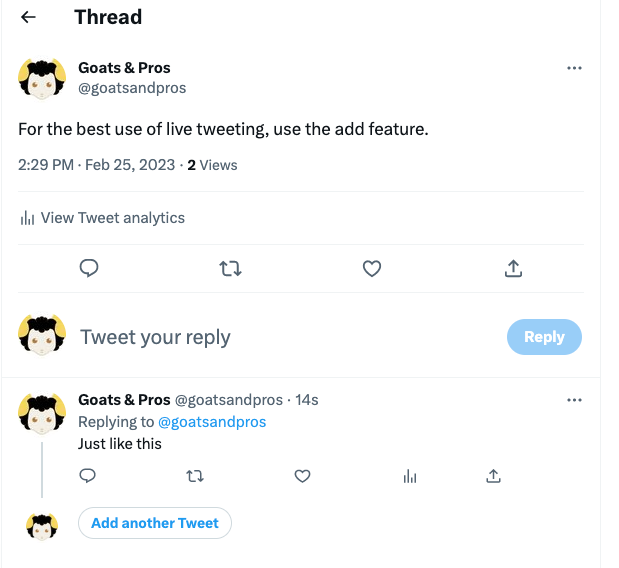
If you find yourself needing to post about a topic in more than one Tweet, or want to do live updates during a match, it's best to use the Tweet "Add" feature. It is the plus symbol + next to Tweet.

Once you have posted this thread, you can add to it and keep all of your Tweets nestled into one thread. It prevents you from cluttering your feed and allows your audience to ignore the live Tweets as well. You will have to go to the parent thread each time to make sure you are "Add another Tweet" to the thread and not just Tweeting separate posts. (Learned that one the hard way)
Back to Top
Twitter Graphics:
The graphic dimensions have changed over the years. As of Feb 2023, here are the recommended sizes:
Profile picture- 400px by 400 px (1:1 ratio)
Profile banner- 1500 by 500 px
For posts:
1600 px by 900 px minimum (2:1 or 1:1 on desktop; 2:1, 3:4 and 16:9 on mobile)
Max file size 5MB for photos and gifs
4 images per tweet.
Back to Top
2. Discord Servers
Discord may not feel like a social media platform, but it is! Build your active community here.
Discord Servers, with the benefit of bots, can be a great alternative to newsletters for distributing information to your active community.

Create a server by clicking the green plus sign from the bottom left of your Discord and start filling out the Categories and Channels how you want. Start small and grow as your community does!
Roles are how you communicate with large groups of people in Discord and can be very overwhelming for a lot of people. It's very straightforward and I suggest you make a fake server just to learn how roles and channel permissions work. In discord chat, you "ping" a role by writing @role and everyone who has that role will get a notification.
Be sure to add roles like "moderator, admin, fans, event, movie night" so that you can refrain from using the default "Here" and "Everyone pings". It's really safe to say that EVERYONE HATES EVERYONE PINGS and they will mute your server very quickly.
You can also change the permissions of channels by clicking the gear icon next to the category or channel and going through the permissions. An easy way of making announcement channels is to turn off the permission for "everyone" to post except moderators, and boom, you have an announcement channel.
Inviting people to your server is also very straightforward. At the top of your server menu, click the down arrow and then "invite people." You can either invite people directly or grab an invite link. What you want to change first though is when the link expires. Click "edit invite link" in blue to change the expiration to never. Now you can post this invite link in other discord servers, and on your other socials, and it will always be good to go!
Consider specific bots like mee6, carlbot, or YAGPDB (YAG) to auto-moderate until you have moderators on your staff. These tools do have premium features, but their base tools are very robust. Until discord builds more native features into their programs, Discord bots will really be the way to go for automatically assigning roles, sending other social media feeds, and embedded posts.
Host events and workshops through Discord to provide an extra value proposition to encourage your existing members to recruit more.
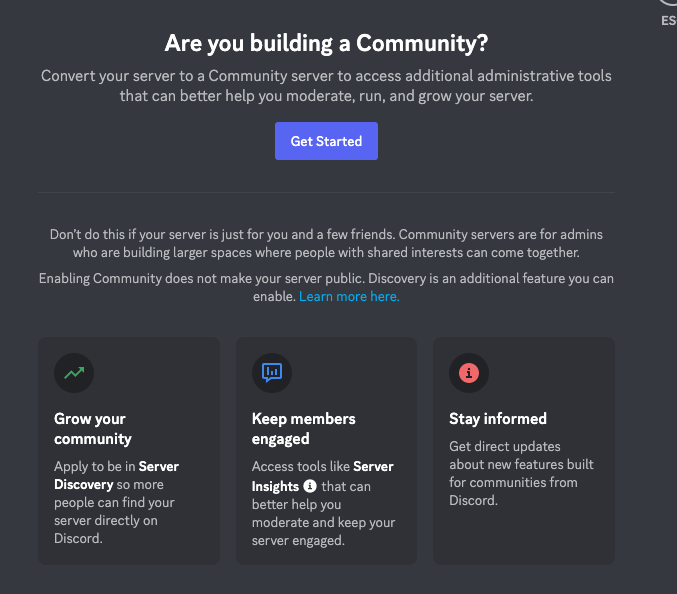
You can't schedule posts in Native discord, but you can schedule events using Discord Events in servers that are Communities. Becoming a Community discord server is also the first step to allowing your community to "boost" your server with Nitro and becoming a Partnered server. Boosting servers unlocks great benefits like higher quality voice and video sharing, more emojis and stickers, and the coveted custom discord invite links.
Enable Communities by going to your server's settings and follow the instructions under community.
Additionally, know your responsibilities of protecting minors in your Discord server and come up with a clear plan if you detect abuse happening in your server. If you are a minor yourself, bring in a trusted adult who can handle this with you. For the US, the FBI has a Cyber Tip website for online child sexual exploitation and hotline that you can use to report incidents and to register your brand as a safe haven. I have placed reports through this tip line and will do my best to support you. If you see something, say something, and we can break the cycles of abuse in Esports.
Back to Top
Discord graphics:
Images that you'll need for Discord include:
Word-Title/banner template-no longer than 400 px (To act as headers in text)
event templates-800 wide by 320 px
server icon- 512 by 512 px
server banner (above channel listing)- minimum 960 by 540 px, aspect ratio 16:9
server banner- minimum size 1920x1080px, aspect ratio 16:9 (only the bottom portion of the server banner is seen most of the time)
Emojis-n128 by 128px (no larger than 256kb for animated emoji) JPEG, PNG, GIF
stickers- 320 by 320 (no larger than 512 KB) PNG, APNG format for animated stickers (more on APNG in graphic tools)
invite image 16:9 ratio, similar to the banner.
For posts:
Keep your graphic 400px wide or less. Anything above that will be resized to 400 and may no longer be legible.
Back to Top
3. Twitch
Twitch is particularly helpful if you are live-streaming any portions of your events or individually as a content creator.
Take steps with auto-moderator tools like Nightbot and Streamlabs Cloudbot to protect your chat until you have a moderator on staff. You can additionally turn your chat to emoji only to help with moderation. You can also host polls and giveaways through these tools as well. You will need to add these bots as moderators to your channel either by doing commands in your chat /mod Nightbot or adding them in your settings (easier for actual people than bots)
Take steps to protect yourself and your staff's mental wellness while using Twitch and other live-streaming. Hate raids, or people (individuals or groups) who are spreading hate through spamming chat, are becoming more common on Twitch, especially towards minorities. Know the procedures and aftercare plans for hate and hate-raids before they happen.
Activate mod view on Twitch either by clicking the Sword by chat or by going to twitch.tv/moderator/channelname
From this view, you can click on users to see all of their posts, time them out, delete posts, and ban users. Outside of mod view, you have to rely on chat commands and it is not as user-friendly.
Similarly, your staff can be assigned as an editor and be able to update your stream title, make clips easier, and do other things for your channel. They can navigate to this view by going to twitch.tv/twitchchannelsname/dashboard/live
Finally, you can autohost members of your community (done in your settings) and raid servers with your viewers before you log off for the night. Positive raids (NOT HATE RAIDS) are a great way to keep the momentum going and your audience can opt out of joining. Any Mod can simply type "/raid channelname" in your chat to start it.
VODs (videos that were previously live-streamed) can be saved on Twitch but the setting is turned off by default. How long they can be saved depends on the account type. You can circumvent this by "highlighting" portions or all of the previous live-streamed events. Note that your views will reset.
Check out our upcoming post "How To build a Solid Stream Package" when it's published.
Back to Top
Twitch Images you need-
Top Profile Banner- 1200 by 480px (banner is reactive- means it scales to users browser, and often has a video in front of it, so test to see your graphic place)
Profile picture- 800 by 800 px (1:1 ratio)
Player banner (offline, etc) 1920 by 1080 px (16:9 ratio)
Video Thumbnail (custom thumbnails for VODs and highlights) 1280 by 720 px
About section panels- 320 px wide.
For your streaming package itself, check out our blog which goes into depth.
Back to Top
3. Youtube
Youtube allows you to upload edited content, Youtube Shorts, and stream live. I have less experience with Youtube, so I'll keep it to just the information that I know about!
For everything on youtube, don't be afraid to change the thumbnail or the titles and descriptions. Youtubers are well aware that some titles and thumbnails don't gain as much traction and will continue to tweak them in the first few days of launching the video.
Particularly for descriptions, avoid linking outside of youtube, as Youtube will naturally want to keep viewers on the platform (and push your video out less). Instead, talk about those outside resources in your video and only include one external link. The other links in your description should be to other recommended videos on youtube that are related.
Use a Call-to-action in your description and in your videos. The common CTA is like, comment and subscribe, but you can get creative with how you want to explain yourself.
For sponsored content, make sure you say it's sponsored! It's illegal not to include that it's paid content or paid product placement.
You can upload content either on mobile or on your computer through the studio.
Shorts :
must be less than 60 seconds and 9:16 aspect ratio (1080 x 1920; vertical) When uploading videos, Youtube will automatically determine if it is a Short or a normal video.
Thumbnail: 720 by 1280 (verticle)
Videos: To upload previously recorded videos over 10 minutes long, you must verify your account with a phone number. Google has the instructions in your account.
For quality: Video dimenisions
2160p: 3840 by 2160.
1440p: 2560 by 1440.
1080p: 1920 by 1080.
720p: 1280 by 720.
480p: 854 by 480.
360p: 640 by 360.
240p: 426 by 240.
Thumbnail: 1280 by 720 px (portrait)
Profile:
Banner- 2560 by 1440 pixels, keep the focal point in 1546px by 423px
Icon- 800 by 800 px
Back to Top
Link Bio Tools:
Linktree, Everlinks, Shorby, Tap.bio ETC (Social Media cross posting link list)
Doesn't really matter who you pick, but it's useful to have one, especially when you're utilizing multiple platforms. Often you can only share one link on socials, so it's useful to use a Link Bio tool.
Include all of your socials, but also include your website, merch store, and any other important information that is related to your brand.
Back to Top
Add-on Platforms:
Social Media platforms that can be added to your core group of platforms:
Tiktok: Great for cross-posting your Youtube Shorts, IG Reels, and meme content/trends. Be aware of the security risks that Tiktok presents to you and your devices. Esports and gaming content for younger audiences in short-form videos are more likely to be on Tiktok.
Instagram: IG reels are a great way to recycle content meant for Youtube Shorts and Tiktok. IG is not normally used in gaming marketing so you may not see the engagement there. Primarily, people use IG to follow specific content creators or family and tend to be people in their mid-20s to late 30s.
Facebook and Facebook group: definitely better for IRL events or local communities than general marketing. FB Regional algorithms are still better than the other platforms. People on FB tend to be a more mature audience and can be great for growing your older segments of communities.
Linkedin: LinkedIn can be used to network with other content creators, professionals, and business owners. Most content shared is professional and heavily related to the growth of careers.
Back to Top
Tournament providers:
Start.gg is great at self-promoting within the Rocket League community and is slowly gaining traction in other groups
defensegaming.com is a closed tournament provider for military-only communities. All participants must pass an ID.me verification process. Great staff and events.
Battlefy.com can be a hit or miss for self-promoting events depending on the timing and title of your event.
Challonge.com is a decent tournament platform but depends on external promotion. You have a lot of control over how brackets are formed and can rename rounds.
rivalgames.com is an up-and-coming platform with a dedicated team of hands-on administrators to help.
Back to Top
Places you can learn more:
Sites that you can learn more about marketing, social media marketing, etc
LinkedIn learning- Not free but does have some pretty decent content on there.
Youtube- search up specific phrases more than general concepts, and make sure you're looking at content made in the last year or 6 months for best practices on social media.
Social Media Pulse - They have a free newsletter on LinkedIn and courses on their website.
Back to Top
Paid social media management tools
Platforms (most are paid) to help you manage social media channels, no opinions given (yet)
Buffer
HootSuite
Hubspot
Sprout Social
Tailwind
Back to Top
Phrases and their meanings:
Robust Scheduling Tools- not every platform has native scheduling, or if they do, it's very basic. Robust scheduling, tied with an editorial calendar, lets you plan out marketing content in advance.
Analytics tools- checking each platform and exporting your analytics manually is possible but can be tedious. Some premium tools also have more depth analytics available through the platform's API than the native dashboard shows. Having an eye on your analytics, whether it's manually or with a premium tool, is valid for making sure your strategy is working and hitting the goals you set for each event.
Monitoring- when you see monitoring, think messages; all of your messages, plus insights, in a smart inbox is possible with premium monitoring tools.
Automation- Automation is in regards to automatically responding to chat messages and comments. This is also how you can have smart menus in your chat that users can select different options from and get information quickly that may be relevant to them.
Social listening - a premium tool that looks out for related hashtags, what your audience is saying, and what your competitors are saying. Helps you make informed decisions about future marketing directions or upcoming trends.
Employee advocacy - your staff liking, sharing, and commenting on your posts help the posts so better on each platform's algorithm. Employee advocacy premium tools are there to make sharing content with your staff easier.
Back to Top
In Summary:
This guide can get you started if you had limited knowledge of the major platforms and terminologies. I'll do my best to update it as the image size changes (as they do every 6 months or year), or as new platforms come in and out of popularity for gaming.
If you made it to the end, I promise not all of our articles will be this long 😁
Back to Top


Comments